Installation
Latest released version
The plugin is automatically packaged for each commit to main, so you can use this address as repository URL in your QGIS extensions manager settings:
https://alxwstn.github.io/RAFTHeatmapMkr/plugins.xml
Installation Steps:
Launch QGIS and open the Plugin Manager: Select
Pluginsfrom the menu toolbar, thenManage and Install PluginsSelect
Settings. In the Plugin Repositories, selectAdd. Set theNamefield toRAFT heatmap Repository, and the url field tohttps://alxwstn.github.io/RAFTHeatmapMkr/plugins.xml. SelectOK.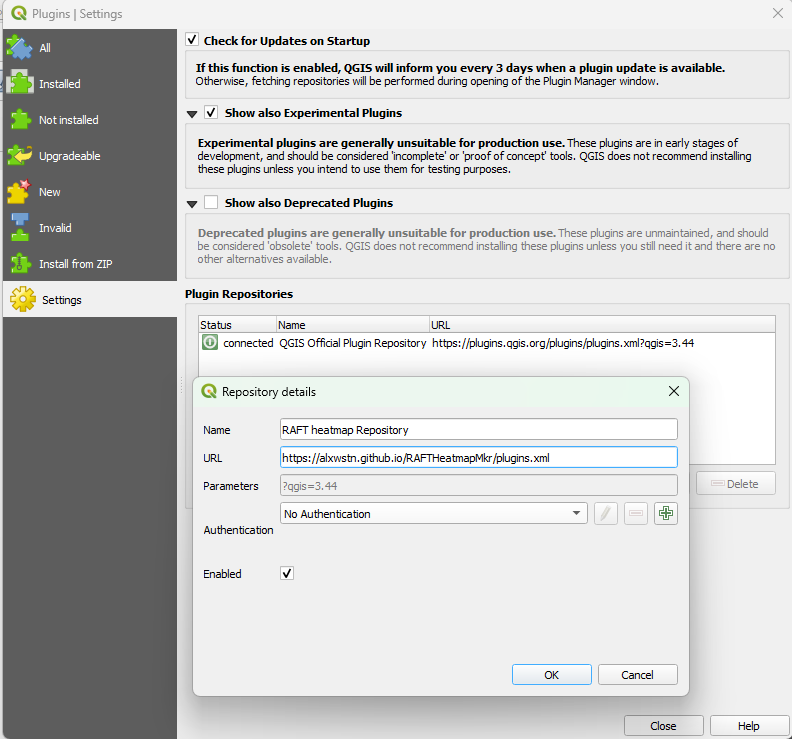
Select
Allon the left hand menu, then filter toraftSelect
raft_heatmapand install
Target a specific version
You can install a specific version of the plugin by downloading the zipped release here and install it as described here.